Kellie's Questions to Ask Before You Book a 4K Wedding Video
Yes. For most couples planning a wedding they’ll want to watch on a real screen for decades, 4K wedding video is worth the upgrade. The main payoff is future-proofing and editing flexibility (cropping for social clips, pulling stills, cleaner color grading), and the main cost is bigger files and typically higher vendor pricing. If your only viewing plan is a phone screen and your budget is tight, 1080p still works fine.
TL;DR:
Shooting in 4K allows for sharper footage, better cropping, and more detailed stills, which remain advantageous for future viewing and social media use.
The larger file sizes and longer rendering times from 4K footage typically increase costs, requiring more storage and powerful editing equipment.
Confirm that videographers use true native 4K sensors and provide clear delivery formats, including master files and social media cuts, to ensure true resolution quality.
For tight budgets or phone-only viewing, 1080p remains sufficient, but 4K offers notable benefits for big screens and creative editing flexibility.
Pre-wedding, clarify backup procedures and exact deliverables to prevent data loss and ensure you receive all intended formats, including original 4K masters.
Table of Contents
What Is 4K Wedding Video, and How Does It Compare to 1080p?
4K means a frame resolution of 3840×2160 pixels, roughly four times the pixel count of standard 1080p high definition wedding video. That extra data is not just a spec sheet number. It changes how footage behaves once your videographer sits down to edit.
When 4K footage gets downsampled to 1080p for a standard delivery file, the resulting image often looks sharper and cleaner than footage shot natively in 1080p. That’s because the editor is compressing extra detail down rather than stretching limited detail up. It also means your editor can crop into a shot, punch in on a reaction, or reframe a wide ceremony angle without the image turning soft or blocky.
There’s a bonus most couples never think about until later: since each 4K frame carries roughly the resolution of an 8-megapixel photograph, a skilled editor can pull a usable still image directly from your wedding film.
What Real Benefits Do Couples Get From 4K Video?
The resolution numbers matter less than what they let you do with your wedding film years after the ceremony. Here’s where 4K actually pays off in practice:
Future-proofing: TVs and projectors keep getting bigger and sharper. A 1080p wedding film shot in 2020 already looks soft on a modern 65-inch television; a 4K master ages far better.
Social-ready reframing: Vertical formats for Reels and TikTok need a tight crop out of a wide horizontal frame. Do that from 1080p source and you lose real sharpness. Do it from 4K and the crop still reads clean on a phone screen.
Still extraction: If your photographer blinked at the exact second of the first kiss but your videographer’s camera was rolling, that frame can become a usable printed still.
Better low light and grading room: Downsampled 4K footage tends to hold up better in dim reception lighting, and color graders have more data to work with before an image starts breaking apart.
That combination is why the cinematic editing techniques shaping modern wedding films lean so heavily on having 4K source material to draw from. Editing craft still does most of the emotional work, but 4K gives an editor more room to make bold creative choices without the image falling apart.
What Do the Tradeoffs and Extra Costs Look Like?
Nothing about 4K is free, and understanding where the cost actually comes from helps you read a vendor’s quote without guessing.
Raw 4K footage runs several times larger than 1080p footage from the same shoot, which means more storage, longer backup times, and heavier archive requirements for your videographer. That storage burden, combined with longer render and export times in post-production, is a real reason 4K packages often cost more than HD-only options.
Here’s what typically drives that price difference upward:
Larger memory cards and more backup drives per wedding day
Editing software and computers powerful enough to scrub through 4K timelines without lag
Longer color-grading and export sessions per project
Cloud or physical archive costs to store client masters long term
Pro Tip: If your budget is genuinely tight, spend it on more coverage hours before you spend it on resolution. An extra hour of footage in 1080p beats a shorter day shot in 4K.
4K is probably overkill if you’re only ever watching the film on a phone, want just a 90-second highlight reel, and have no interest in printing stills later.
How Do You Choose a Videographer Who Actually Shoots 4K?
Plenty of vendors claim “4K” on their website while quietly delivering compressed exports that never touched a true 4K sensor. A short checklist protects you from that gap.
Confirm native 4K capture, not just 4K upscaling in editing software. Ask which camera bodies and sensor sizes they shoot on, and whether their lenses and stabilization gear (gimbals, sliders) match that resolution’s demands.
Ask about audio capture separately from the camera. Wireless lavalier mics on the officiant and a dedicated recorder for vows matter more than resolution for how emotional the film feels.
Get specific on delivery formats. You want a master 4K file, a downscaled HD version for easy sharing, and vertical cuts for social, spelled out in the contract, not implied.
Request to see a native 4K master sample, not just a YouTube-compressed link, so you can judge actual capture quality and codec handling.
Ask about their backup policy. A vendor with no clear answer about how footage is backed up before, during, and after editing is a red flag.
Vague answers about “we deliver in 4K” without specifics on codecs, masters, or backups usually mean the resolution claim is more marketing than workflow.
What Deliverables and File Formats Should You Request?
A wedding video package should spell out exactly what lands in your hands, not just “a video.” Most solid packages bundle a short cinematic highlight (typically 3 to 7 minutes), a longer ceremony and speeches edit, and sometimes a full-day documentary cut.
On the technical side, ask for:
A native 4K master file in a professional codec (commonly H.264 or H.265) for archiving
A downscaled 1080p version sized for easy streaming and sharing with family
Vertical or square social cuts pulled directly from the 4K master, not re-shot separately
A clear turnaround window, since full delivery timelines vary by vendor and season
File sizes for a full wedding’s raw 4K footage can run into hundreds of gigabytes before editing even begins, which is exactly why archive and backup policy belongs in your contract, not an afterthought.
Kellie’s Take: Why Pixel Groves Leans Into 4K Storytelling
Kellie has spent years behind the camera at Pixel Groves, building a reputation around one idea: a wedding film should feel like a movie, not a home video. That focus helped earn Pixel Groves the 2025 Best of Florida Wedding Photographer Award, and it shapes every videography package the team offers, from the Highlight Videography Package to the more comprehensive Ultimate Videography Package and Live Stream Videography Package for guests who can’t attend in person.
Kellie’s approach treats interview footage and native 4K capture as partners, not separate decisions. The resolution gives an editor room to work; the storytelling instinct decides what’s worth keeping.
What Do Different Styles of 4K Wedding Video Actually Look Like?
“4K wedding video” isn’t one look. It’s a resolution standard that gets applied across very different styles, and the style you pick matters as much as the pixel count.
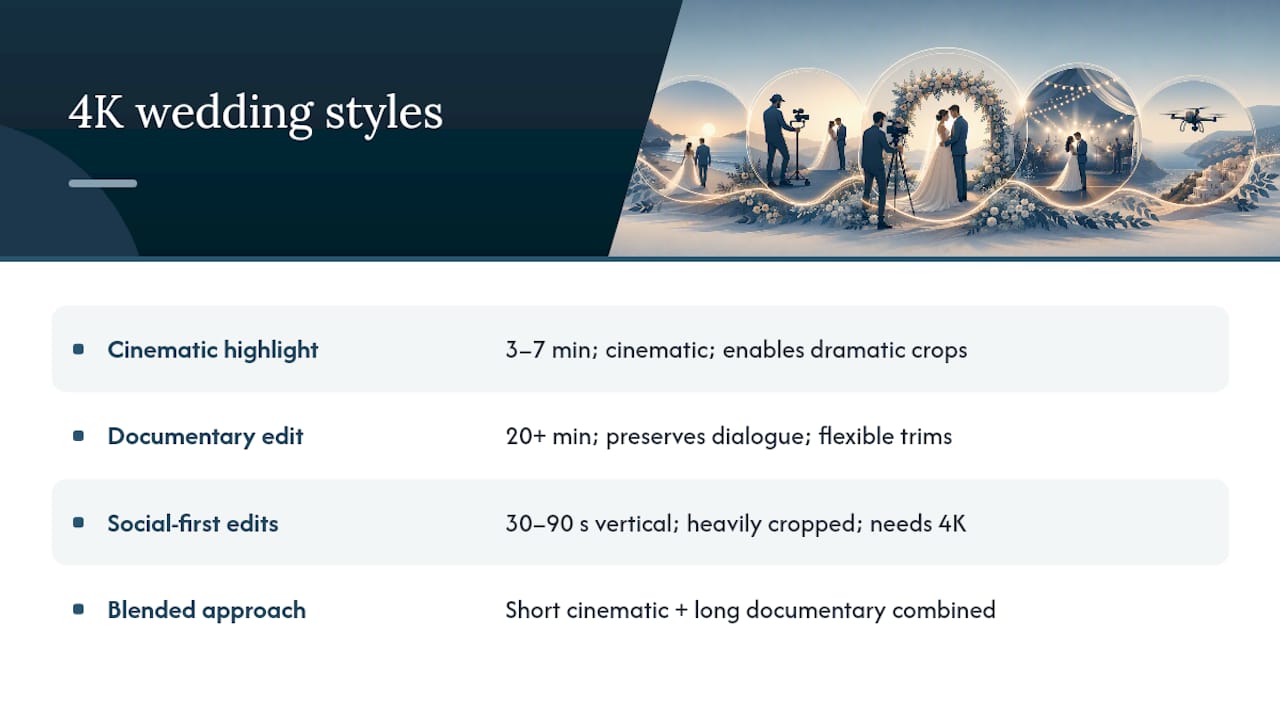
A cinematic highlight film runs 3 to 7 minutes, leans on music, slow motion, and tightly edited moments, and treats your wedding day like a short film with a beginning, middle, and end. Shot in 4K, these hold up beautifully on a living room television years later, and the extra resolution gives editors room for dramatic crops during key emotional beats like the first look or the final dance.
A documentary style edit runs longer, often 20 minutes or more, and preserves more raw dialogue, toasts, and unscripted moments in near real time. Here 4K matters less for dramatic effect and more for flexibility. If a toast runs long, an editor can trim reaction shots without losing image quality on the parts that stay in.
Social-first edits, the 30 to 90 second vertical cuts made for Instagram and TikTok, benefit the most from 4K source footage because they’re almost always cropped tighter than the original frame. A wide reception shot in 4K becomes a punchy vertical clip without visible pixelation; the same crop from 1080p often looks soft on a phone screen.
Many vendors, Pixel Groves included, now blend these approaches. Couples increasingly ask for a short cinematic highlight paired with a longer documentary cut of the ceremony and speeches, which gives them both the movie-trailer version and the complete record.
How Should You Prepare and Back Up Your Wedding Video Files?
Wedding footage is one of those things you cannot reshoot if something goes wrong, so treat file handling with real seriousness before, during, and after the wedding day.
Before the wedding, confirm with your videographer how many memory cards they’re bringing and whether footage gets backed up on-site during the day, not just when they get home. A single point of failure, one card, one drive, is a real risk with irreplaceable footage.
After the shoot, footage should move to at least two separate storage locations before any card gets reformatted. That typically means a working drive for editing and a separate backup drive, ideally kept in a different physical location.
When delivery day comes, ask your vendor to confirm the exact file types you’re receiving: the native 4K master, a compressed 1080p version for easy sharing, and any vertical social cuts. Store the master file on an external drive you don’t use for daily tasks, and consider a cloud backup as a second layer, since drives fail more often than people expect.
Finally, confirm how long your vendor retains your files on their end. Some studios keep client archives for a year or more; others clear projects shortly after final delivery. Get that policy in writing so you’re not caught off guard.
What Does the Timeline Look Like From Shoot to Delivery?
A typical 4K wedding video moves through four distinct phases, and knowing the shape of that timeline helps you set realistic expectations with any vendor.
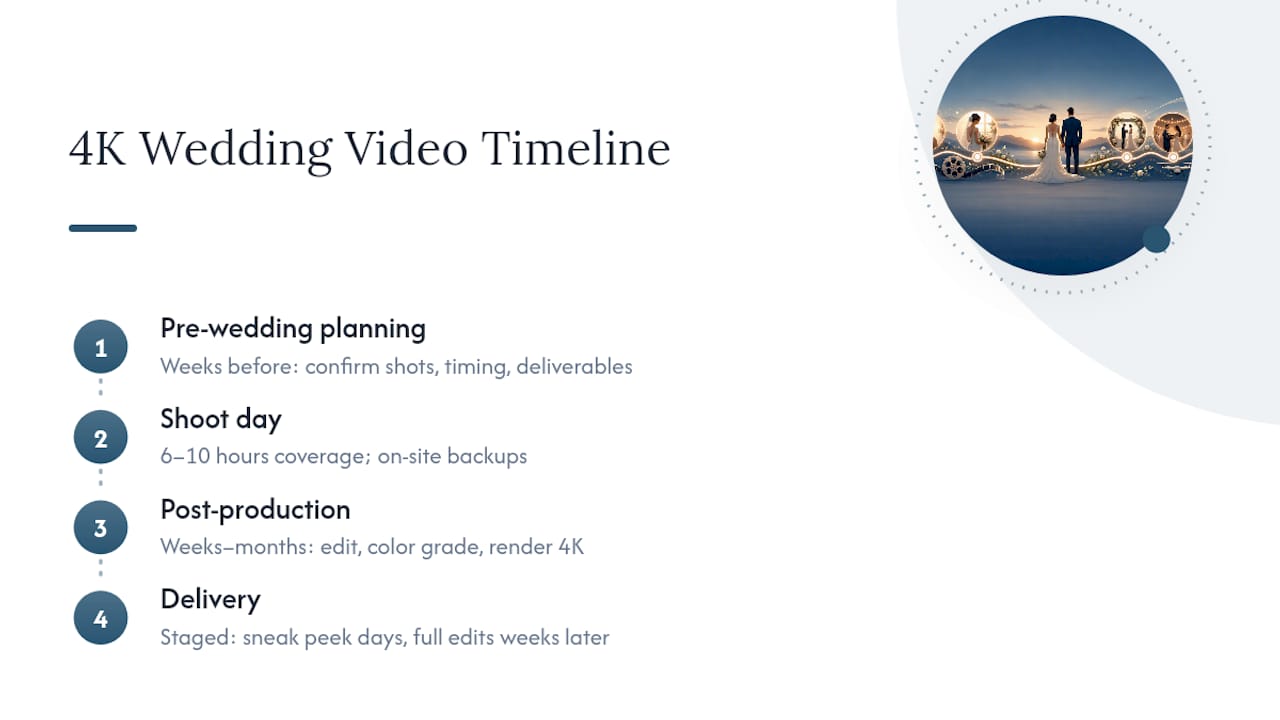
Pre-wedding planning happens weeks before the event, when your videographer confirms shot lists, timing for key moments like the first look, and any specific deliverables you’ve requested, like vertical cuts or extended speeches.
Shoot day itself typically runs anywhere from 6 to 10 hours of coverage, during which raw 4K footage accumulates fast. This is also when on-site backups should be happening in the background.
Post-production is where 4K’s extra weight shows up most. Editing, color grading, and rendering 4K timelines takes noticeably longer than working in 1080p, partly because the files are heavier and partly because higher resolution invites more detailed grading work. This phase commonly runs anywhere from a few weeks to a couple of months, depending on the studio and season.
Delivery usually arrives in stages. Some vendors send a short sneak peek within days, followed by the full highlight film and any longer edits weeks later. Ask upfront which stage each deliverable arrives at, since “delivery” can mean very different things between vendors.
The Practical Rule of Thumb on 4K
Kellie’s shortcut for couples stuck on this decision: if you’re renting a big venue, want a big-screen anniversary watch party, or want the option to pull stills later, 4K is a must. If you mainly want great social clips and rich color, it’s a strong nice-to-have. If your budget is tight and a phone screen is the only screen this will ever play on, skip it and put that money toward more coverage hours instead.
— Kellie
Ready to Book a 4K Wedding Film?
Some videography packages are built around native 4K capture, so you’re not choosing between cinematic quality and future-proofing. The Highlight Videography Package covers couples who want a tight, emotional short film, while the Ultimate Videography Package adds fuller ceremony and reception coverage for couples who want the complete story preserved, not just the highlight reel. Some videography packages may include live streaming options for guests who can’t attend in person.
[
When you reach out for a quote, come ready with your wedding date, venue, and the specific deliverables you care about most, whether that’s vertical social cuts, a full ceremony edit, or a request to see native 4K masters before you sign anything. Also, worth a look if you’re planning ahead: the Engagement + Proposal Photography & Videography package pairs naturally with a wedding video package for couples who want a consistent visual story from proposal to reception. Check current pricing and package details on the Pixel Groves pricing page to see what fits your day.
Sources
FAQ
Is 4K Better Than Full HD for a Wedding Video?
Yes, for most couples. 4K captures roughly four times the pixel detail of 1080p, which means sharper downsampled footage, more room to crop for social clips, and the ability to pull usable stills from the footage.
Is $4,000 a Lot to Spend on a Wedding Photographer?
It depends on your market and what’s included, but pricing varies widely for full-day photography packages. Pixel Groves offers a range of photography packages with different coverage levels, so pricing well within typical budgets for solid coverage is achievable.
What Does a Wedding Video Typically Cost?
Pricing varies widely by region and package scope, but videography packages that include cinematic editing and 4K capture commonly run into the low thousands of dollars, depending on coverage depth.
Should I Choose 1080p or 4K for My Wedding Video?
Choose 4K if you want future-proofing, social-ready crops, or the option to extract stills later; choose 1080p only if your budget is tight and phone viewing is your only real use case. For most couples planning to watch their film for years, 4K is the stronger long-term choice.
What Should I Request From a Videographer Who Shoots in 4K?
Ask for a native 4K master file, a downscaled 1080p delivery version, and vertical cuts for social media, along with a clear answer on how footage gets backed up before and after editing.
Recommended
Comments